



When using online tools, one question arises: what happens to my data?
With tomato, the answer depends on how you use it. There isn’t a single deployment model, there are several, each balancing convenience, scalability, and data control.
Understanding data flow in each setup lets you make an informed decision aligned with your organization’s policies and risk tolerance. The right choice depends on your requirements, infrastructure, and data sensitivity.
Tomato CLI – Fully Local, No Data Leaves Your Machine
Let’s start with the obvious: if you use the tomato CLI, everything happens locally:
- model parsing
- combinatorial test generation
- expression evaluation
- CSV output generation
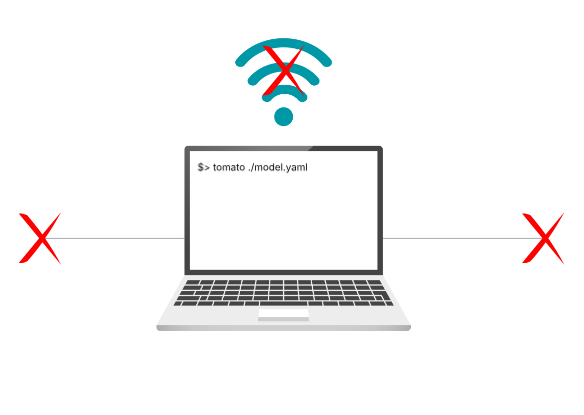
No network communication, telemetry, or background calls occur. Your data stays on your machine.
Hosted GUI – Convenience with Tradeoffs
The hosted GUI is the fastest way to start but requires external communication. Your browser downloads the web application from the tomato server. Each time you modify the model or generate tests, the model is sent to a command backend implemented as AWS Lambda functions. The command backend do not store or analyze user data beyond what is needed for validation and test generation. AI assistant and autocomplete features also send model data to external AI services.
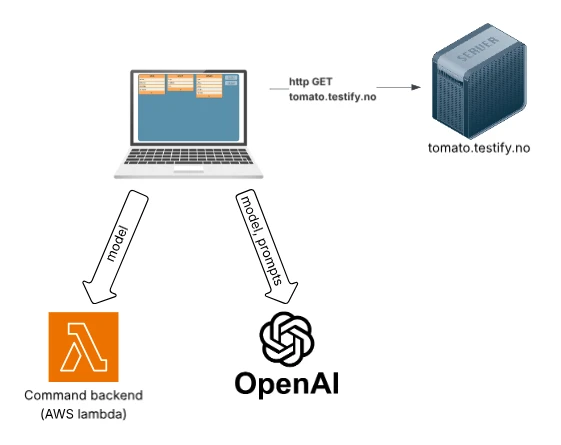
To clarify:
- Model data is sent to tomato backend services on AWS for validation and generation,
- AI features send data to external AI providers
This setup offers zero installation, immediate availability, and high scalability but requires sending model data outside the user’s environment.
Hybrid Deployment – Local Core, External AI
In the hybrid setup, the web application server and the command backend run inside a docker container. AI-related requests are directed to an external AI service provider. You have the option to enable AI features according to your preferences and can select your preferred AI provider from available options. This design ensures that the core model processing remains within your own infrastructure, thereby maintaining control over sensitive operations. When AI features are enabled, the AI prompts and model are sent externally.
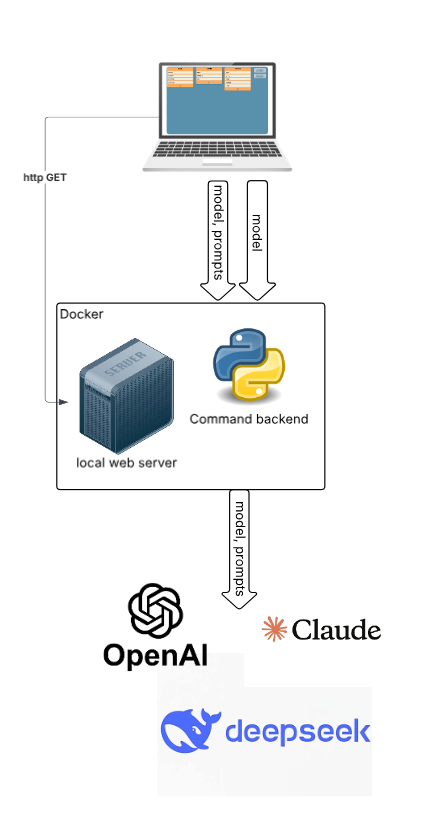
This approach effectively balances the need for control with the desire for advanced functionality. It empowers you to decide exactly how much data you want to send outside your premises, giving you full control over data privacy and security. Additionally, you can choose which AI provider to use based on your requirements and trust preferences, allowing for flexibility and customization in your AI integrations.
Fully Local Deployment – Maximum Control
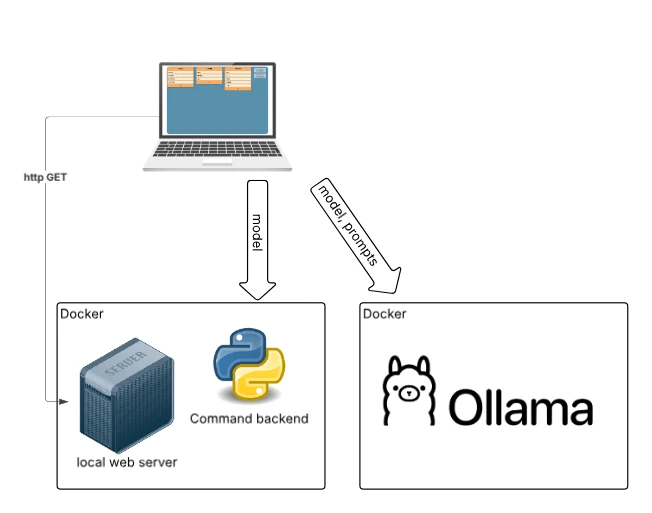
For environments with strict privacy requirements, all components: web application, command backend, and AI services can be hosted locally. In this setup, no data leaves the user’s infrastructure, and no external APIs are needed. The AI model can run on dedicated hardware or on-premise infrastructure. This setup ensures full data control and independence from external services, meeting strict security policies. The trade-offs are increased setup complexity and lower scalability compared to cloud solutions.
Back to blog